Synthesis starter
This page will be a guided walkthrough of the prepackaged iCE40 FPGA synthesis
script - synth_ice40. We will take a simple design through each step, looking
at the commands being called and what they do to the design. While synth_ice40
is specific to the iCE40 platform, most of the operations we will be discussing
are common across the majority of FPGA synthesis scripts. Thus, this document
will provide a good foundational understanding of how synthesis in Yosys is
performed, regardless of the actual architecture being used.
See also
Advanced usage docs for Synth commands
Demo design
First, let’s quickly look at the design we’ll be synthesizing:
 1// address generator/counter
 2module addr_gen
 3#(  parameter MAX_DATA=256,
 4	localparam AWIDTH = $clog2(MAX_DATA)
 5) ( input en, clk, rst,
 6	output reg [AWIDTH-1:0] addr
 7);
 8	initial addr = 0;
 9
10	// async reset
11	// increment address when enabled
12	always @(posedge clk or posedge rst)
13		if (rst)
14			addr <= 0;
15		else if (en) begin
16			if ({'0, addr} == MAX_DATA-1)
17				addr <= 0;
18			else
19				addr <= addr + 1;
20		end
21endmodule //addr_gen
22
23// Define our top level fifo entity
24module fifo
25#(  parameter MAX_DATA=256,
26	localparam AWIDTH = $clog2(MAX_DATA)
27) ( input wen, ren, clk, rst,
28	input [7:0] wdata,
29	output reg [7:0] rdata,
30	output reg [AWIDTH:0] count
31);
32	// fifo storage
33	// sync read before write
34	wire [AWIDTH-1:0] waddr, raddr;
35	reg [7:0] data [MAX_DATA-1:0];
36	always @(posedge clk) begin
37		if (wen)
38			data[waddr] <= wdata;
39		rdata <= data[raddr];
40	end // storage
41
42	// addr_gen for both write and read addresses
43	addr_gen #(.MAX_DATA(MAX_DATA))
44	fifo_writer (
45		.en     (wen),
46		.clk    (clk),
47		.rst    (rst),
48		.addr   (waddr)
49	);
50
51	addr_gen #(.MAX_DATA(MAX_DATA))
52	fifo_reader (
53		.en     (ren),
54		.clk    (clk),
55		.rst    (rst),
56		.addr   (raddr)
57	);
58
59	// status signals
60	initial count = 0;
61
62	always @(posedge clk or posedge rst) begin
63		if (rst)
64			count <= 0;
65		else if (wen && !ren)
66			count <= count + 1;
67		else if (ren && !wen)
68			count <= count - 1;
69	end
70
71endmodule
While the open source read_verilog frontend generally does a pretty good job
at processing valid Verilog input, it does not provide very good error handling
or reporting. Using an external tool such as verilator before running Yosys
is highly recommended. We can quickly check the Verilog syntax of our design by
calling verilator --lint-only fifo.v.
Loading the design
Let’s load the design into Yosys. From the command line, we can call yosys
fifo.v. This will open an interactive Yosys shell session and immediately
parse the code from fifo.v and convert it into an Abstract Syntax Tree
(AST). If you are interested in how this happens, there is more information in
the document, The Verilog and AST frontends. For now, suffice
it to say that we do this to simplify further processing of the design. You
should see something like the following:
$ yosys fifo.v

-- Parsing `fifo.v' using frontend ` -vlog2k' --

1. Executing Verilog-2005 frontend: fifo.v
Parsing Verilog input from `fifo.v' to AST representation.
Storing AST representation for module `$abstract\addr_gen'.
Storing AST representation for module `$abstract\fifo'.
Successfully finished Verilog frontend.
See also
Advanced usage docs for Loading a design
Elaboration
Now that we are in the interactive shell, we can call Yosys commands directly.
Our overall goal is to call synth_ice40 -top fifo, but for now we
can run each of the commands individually for a better sense of how each part
contributes to the flow. We will also start with just a single module;
addr_gen.
At the bottom of the help output for
synth_ice40 is the complete list of commands called by this script.
Let’s start with the section labeled begin:
read_verilog -D ICE40_HX -lib -specify +/ice40/cells_sim.v
hierarchy -check -top <top>
proc
read_verilog -D ICE40_HX -lib -specify +/ice40/cells_sim.v loads the
iCE40 cell models which allows us to include platform specific IP blocks in our
design. PLLs are a common example of this, where we might need to reference
SB_PLL40_CORE directly rather than being able to rely on mapping passes
later. Since our simple design doesn’t use any of these IP blocks, we can skip
this command for now. Because these cell models will also be needed once we
start mapping to hardware we will still need to load them later.
Note
+/ is a dynamic reference to the Yosys share directory. By default,
this is /usr/local/share/yosys. If using a locally built version of
Yosys from the source directory, this will be the share folder in the
same directory.
The addr_gen module
Since we’re just getting started, let’s instead begin with hierarchy
-top addr_gen. This command declares that the top level module is
addr_gen, and everything else can be discarded.
 2module addr_gen
 3#(  parameter MAX_DATA=256,
 4	localparam AWIDTH = $clog2(MAX_DATA)
 5) ( input en, clk, rst,
 6	output reg [AWIDTH-1:0] addr
 7);
 8	initial addr = 0;
 9
10	// async reset
11	// increment address when enabled
12	always @(posedge clk or posedge rst)
13		if (rst)
14			addr <= 0;
15		else if (en) begin
16			if ({'0, addr} == MAX_DATA-1)
17				addr <= 0;
18			else
19				addr <= addr + 1;
20		end
21endmodule //addr_gen
Note
hierarchy should always be the first command after the design has been
read. By specifying the top module, hierarchy will also set the (* top
*) attribute on it. This is used by other commands that need to know which
module is the top.
yosys> hierarchy -top addr_gen

2. Executing HIERARCHY pass (managing design hierarchy).

3. Executing AST frontend in derive mode using pre-parsed AST for module `\addr_gen'.
Generating RTLIL representation for module `\addr_gen'.

3.1. Analyzing design hierarchy..
Top module:  \addr_gen

3.2. Analyzing design hierarchy..
Top module:  \addr_gen
Removing unused module `$abstract\fifo'.
Removing unused module `$abstract\addr_gen'.
Removed 2 unused modules.
Our addr_gen circuit now looks like this:
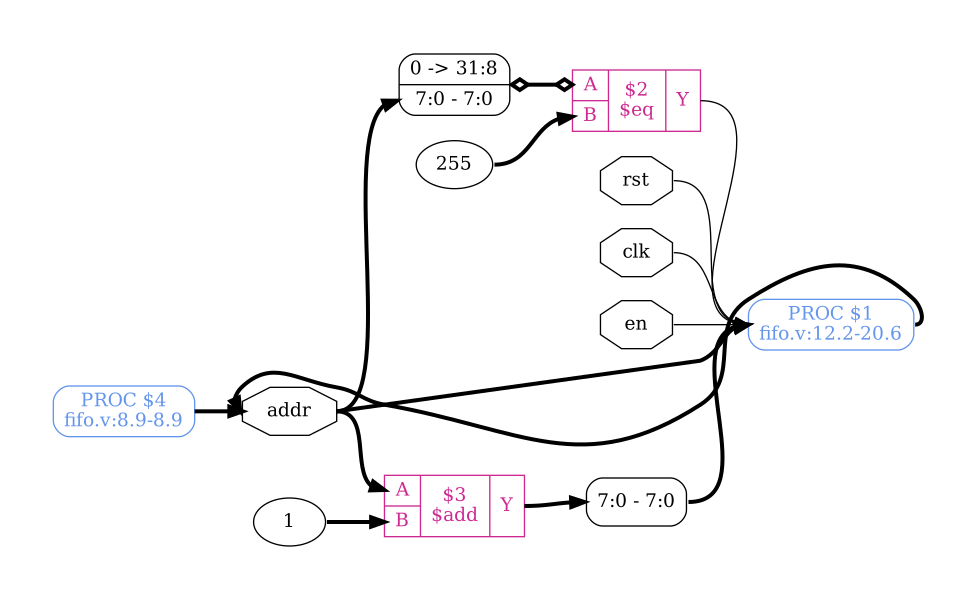
Simple operations like addr + 1 and addr == MAX_DATA-1 can be extracted
from our always @ block in addr_gen module source. This gives us the highlighted
$add and $eq cells we see. But control logic (like the if .. else) and
memory elements (like the addr <= 0) are not so straightforward. These get
put into “processes”, shown in the schematic as PROC. Note how the second
line refers to the line numbers of the start/end of the corresponding always
@ block. In the case of an initial block, we instead see the PROC
referring to line 0.
To handle these, let us now introduce the next command: proc - translate processes to netlists.
proc is a macro command like synth_ice40. Rather than modifying the design
directly, it instead calls a series of other commands. In the case of proc,
these sub-commands work to convert the behavioral logic of processes into
multiplexers and registers. Let’s see what happens when we run it. For now, we
will call proc -noopt to prevent some automatic optimizations which
would normally happen.
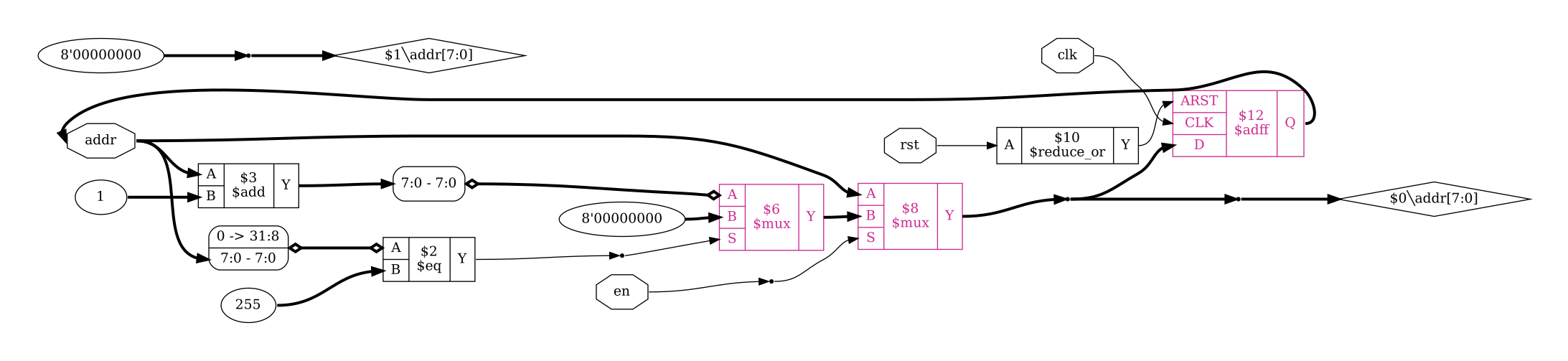
Fig. 3 addr_gen module after proc -noopt
There are now a few new cells from our always @, which have been
highlighted. The if statements are now modeled with $mux cells, while the
register uses an $adff cell. If we look at the terminal output we can also
see all of the different proc_* commands being called. We will look at each
of these in more detail in Converting process blocks.
Notice how in the top left of addr_gen module after proc -noopt we have a floating wire,
generated from the initial assignment of 0 to the addr wire. However, this
initial assignment is not synthesizable, so this will need to be cleaned up
before we can generate the physical hardware. We can do this now by calling
clean. We’re also going to call opt_expr now, which would normally be
called at the end of proc. We can call both commands at the same time by
separating them with a colon and space: opt_expr; clean.
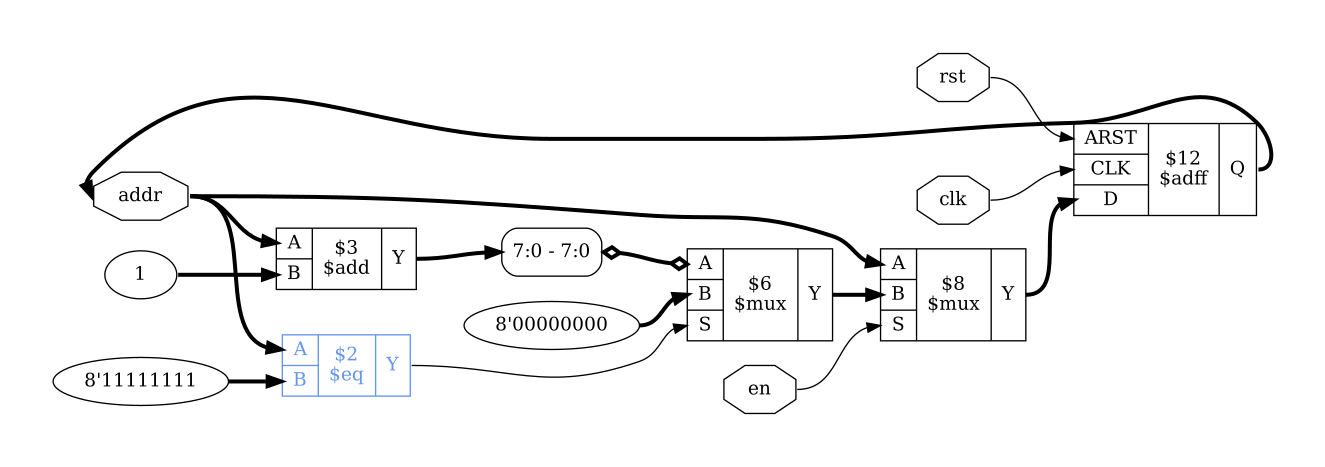
Fig. 4 addr_gen module after opt_expr; clean
You may also notice that the highlighted $eq cell input of 255 has changed
to 8'11111111. Constant values are presented in the format
<bit_width>'<bits>, with 32-bit values instead using the decimal number.
This indicates that the constant input has been reduced from 32-bit wide to
8-bit wide. This is a side-effect of running opt_expr, which performs
constant folding and simple expression rewriting. For more on why this
happens, refer to Optimization passes and the section on
opt_expr.
Note
clean - remove unused cells and wires can also be called with two semicolons after any command,
for example we could have called opt_expr;; instead of
opt_expr; clean. You may notice some scripts will end each line
with ;;. It is beneficial to run clean before inspecting intermediate
products to remove disconnected parts of the circuit which have been left
over, and in some cases can reduce the processing required in subsequent
commands.
The full example
Let’s now go back and check on our full design by using hierarchy
-check -top fifo. By passing the -check option there we are also telling
the hierarchy command that if the design includes any non-blackbox modules
without an implementation it should return an error.
Note that if we tried to run this command now then we would get an error. This
is because we already removed all of the modules other than addr_gen. We
could restart our shell session, but instead let’s use two new commands:
yosys> design -reset

yosys> read_verilog fifo.v

11. Executing Verilog-2005 frontend: fifo.v
Parsing Verilog input from `fifo.v' to AST representation.
Generating RTLIL representation for module `\addr_gen'.
Generating RTLIL representation for module `\fifo'.
Successfully finished Verilog frontend.

yosys> hierarchy -check -top fifo

12. Executing HIERARCHY pass (managing design hierarchy).

12.1. Analyzing design hierarchy..
Top module:  \fifo
Used module:     \addr_gen
Parameter \MAX_DATA = 256

12.2. Executing AST frontend in derive mode using pre-parsed AST for module `\addr_gen'.
Parameter \MAX_DATA = 256
Generating RTLIL representation for module `$paramod\addr_gen\MAX_DATA=s32'00000000000000000000000100000000'.
Parameter \MAX_DATA = 256
Found cached RTLIL representation for module `$paramod\addr_gen\MAX_DATA=s32'00000000000000000000000100000000'.

12.3. Analyzing design hierarchy..
Top module:  \fifo
Used module:     $paramod\addr_gen\MAX_DATA=s32'00000000000000000000000100000000

12.4. Analyzing design hierarchy..
Top module:  \fifo
Used module:     $paramod\addr_gen\MAX_DATA=s32'00000000000000000000000100000000
Removing unused module `\addr_gen'.
Removed 1 unused modules.
Notice how this time we didn’t see any of those $abstract modules? That’s
because when we ran yosys fifo.v, the first command Yosys called was
read_verilog -defer fifo.v. The -defer option there tells
read_verilog only read the abstract syntax tree and defer actual compilation
to a later hierarchy command. This is useful in cases where the default
parameters of modules yield invalid code which is not synthesizable. This is why
Yosys defers compilation automatically and is one of the reasons why hierarchy
should always be the first command after loading the design. If we know that
our design won’t run into this issue, we can skip the -defer.
Note
The number before a command’s output increments with each command run. Don’t
worry if your numbers don’t match ours! The output you are seeing comes from
the same script that was used to generate the images in this document,
included in the source as fifo.ys. There are extra commands being run
which you don’t see, but feel free to try them yourself, or play around with
different commands. You can always start over with a clean slate by calling
exit or hitting ctrl+d (i.e. EOF) and re-launching the Yosys
interactive terminal. ctrl+c (i.e. SIGINT) will also end the terminal
session but will return an error code rather than exiting gracefully.
We can also run proc now to finish off the full begin section. Because
the design schematic is quite large, we will be showing just the data path for
the rdata output. If you would like to see the entire design for yourself,
you can do so with show - generate schematics using graphviz. Note that the show command only works
with a single module, so you may need to call it with show fifo.
Displaying schematics section in Scripting in Yosys has more on
how to use show.

The highlighted fifo_reader block contains an instance of the
addr_gen module after proc -noopt that we looked at earlier. Notice how the type is shown as
$paramod\\addr_gen\\MAX_DATA=s32'.... This is a “parametric module”: an
instance of the addr_gen module with the MAX_DATA parameter set to the
given value.
The other highlighted block is a $memrd cell. At this stage of synthesis we
don’t yet know what type of memory is going to be implemented, but we do know
that rdata <= data[raddr]; could be implemented as a read from memory. Note
that the $memrd cell here is asynchronous, with both the clock and enable
signal undefined; shown with the 1'x inputs.
See also
Advanced usage docs for Converting process blocks
Flattening
At this stage of a synthesis flow there are a few other commands we could run.
In synth_ice40 we get these:
flatten
tribuf -logic
deminout
First off is flatten. Flattening the design like this can allow for
optimizations between modules which would otherwise be missed. Let’s run
flatten;; on our design.
yosys> flatten

15. Executing FLATTEN pass (flatten design).
Deleting now unused module $paramod\addr_gen\MAX_DATA=s32'00000000000000000000000100000000.
<suppressed ~2 debug messages>

yosys> clean
Removed 3 unused cells and 28 unused wires.
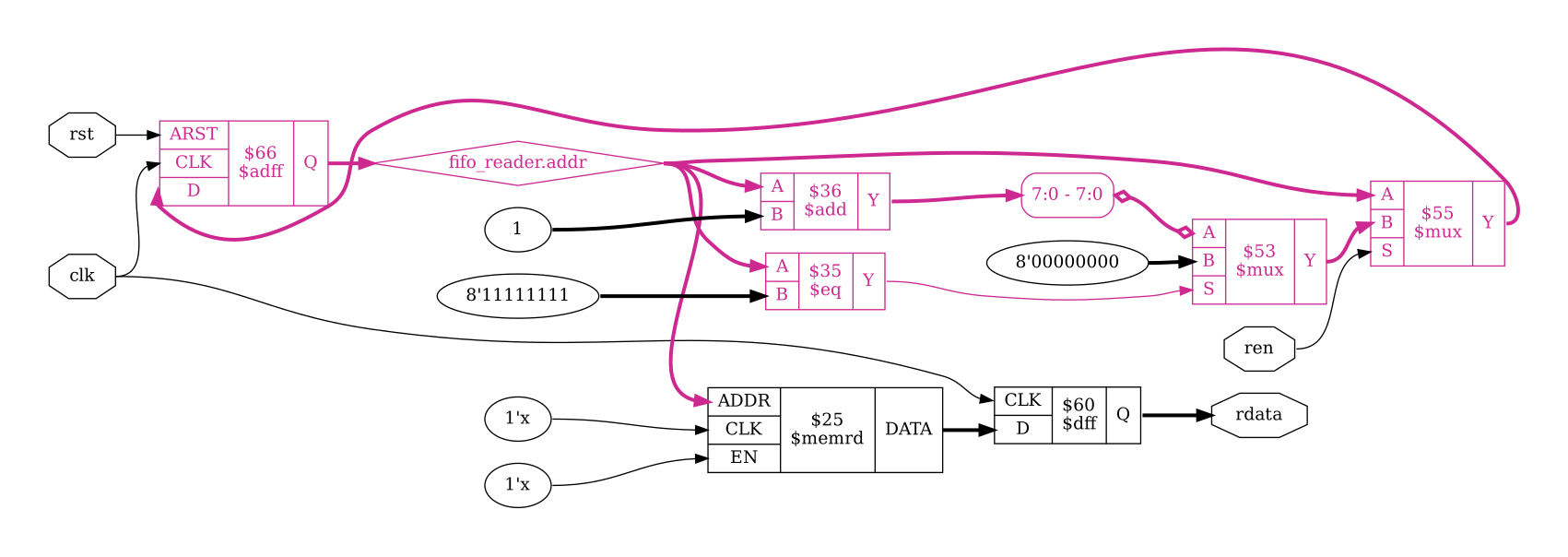
Fig. 6 rdata output after flatten;;
The pieces have moved around a bit, but we can see addr_gen module after proc -noopt from
earlier has replaced the fifo_reader block in rdata output after proc. We can
also see that the addr output has been renamed to fifo_reader.addr
and merged with the raddr wire feeding into the $memrd cell. This wire
merging happened during the call to clean which we can see in the
output of flatten;;.
Note
flatten and clean would normally be combined into a
single yosys> flatten;; output, but they appear separately here as
a side effect of using echo for generating the terminal style
output.
Depending on the target architecture, this stage of synthesis might also see
commands such as tribuf with the -logic option and deminout. These
remove tristate and inout constructs respectively, replacing them with logic
suitable for mapping to an FPGA. Since we do not have any such constructs in
our example running these commands does not change our design.
The coarse-grain representation
At this stage, the design is in coarse-grain representation. It still looks recognizable, and cells are word-level operators with parametrizable width. This is the stage of synthesis where we do things like const propagation, expression rewriting, and trimming unused parts of wires.
This is also where we convert our FSMs and hard blocks like DSPs or memories. Such elements have to be inferred from patterns in the design and there are special passes for each. Detection of these patterns can also be affected by optimizations and other transformations done previously.
Note
While the iCE40 flow had a flatten section and put proc in the
begin section, some synthesis scripts will instead include these in this
section.
Part 1
In the iCE40 flow, we start with the following commands:
opt_expr
opt_clean
check
opt -nodffe -nosdff
fsm
opt
We’ve already come across opt_expr, and opt_clean is the same as clean but
with more verbose output. The check pass identifies a few obvious problems
which will cause errors later. Calling it here lets us fail faster rather than
wasting time on something we know is impossible.
Next up is opt -nodffe -nosdff performing a set of simple
optimizations on the design. This command also ensures that only a specific
subset of FF types are included, in preparation for the next command:
fsm - extract and optimize finite state machines. Both opt and fsm are macro commands which are explored in
more detail in Optimization passes and
FSM handling respectively.
Up until now, the data path for rdata has remained the same since
rdata output after flatten;;. However the next call to opt does cause a change.
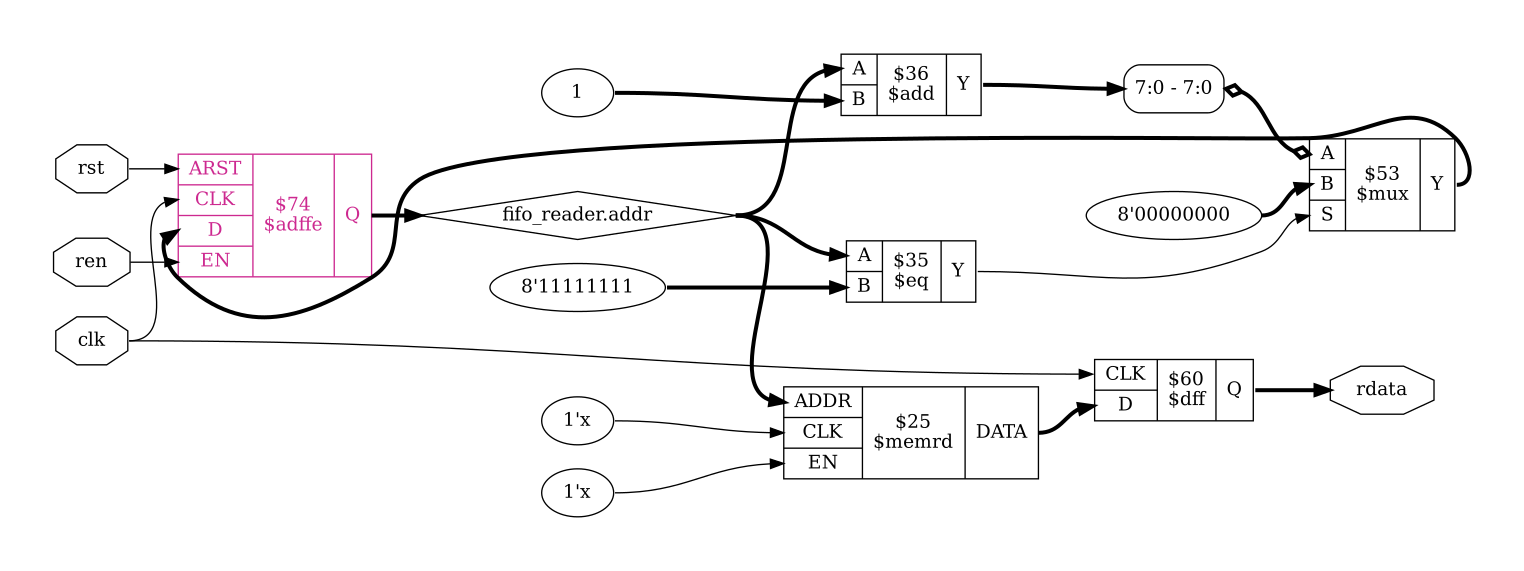
Specifically, the call to opt_dff without the -nodffe -nosdff options is
able to fold one of the $mux cells into the $adff to form an $adffe cell;
highlighted below:
yosys> opt_dff

17. Executing OPT_DFF pass (perform DFF optimizations).
Adding EN signal on $procdff$59 ($adff) from module fifo (D = $0\count[8:0], Q = \count).
Adding EN signal on $flatten\fifo_writer.$procdff$66 ($adff) from module fifo (D = $flatten\fifo_writer.$procmux$53_Y, Q = \fifo_writer.addr).
Adding EN signal on $flatten\fifo_reader.$procdff$66 ($adff) from module fifo (D = $flatten\fifo_reader.$procmux$53_Y, Q = \fifo_reader.addr).
Part 2
The next group of commands performs a series of optimizations:
wreduce
peepopt
opt_clean
share
techmap
opt_expr
opt_clean
memory_dff
First up is wreduce - reduce the word size of operations if possible. If we run this we get the following:
yosys> wreduce

19. Executing WREDUCE pass (reducing word size of cells).
Removed top 31 bits (of 32) from port B of cell fifo.$add$fifo.v:66$29 ($add).
Removed top 23 bits (of 32) from port Y of cell fifo.$add$fifo.v:66$29 ($add).
Removed top 31 bits (of 32) from port B of cell fifo.$sub$fifo.v:68$32 ($sub).
Removed top 23 bits (of 32) from port Y of cell fifo.$sub$fifo.v:68$32 ($sub).
Removed top 1 bits (of 2) from port B of cell fifo.$auto$opt_dff.cc:248:make_patterns_logic$72 ($ne).
Removed cell fifo.$flatten\fifo_writer.$procmux$55 ($mux).
Removed top 31 bits (of 32) from port B of cell fifo.$flatten\fifo_writer.$add$fifo.v:19$36 ($add).
Removed top 24 bits (of 32) from port Y of cell fifo.$flatten\fifo_writer.$add$fifo.v:19$36 ($add).
Removed cell fifo.$flatten\fifo_reader.$procmux$55 ($mux).
Removed top 31 bits (of 32) from port B of cell fifo.$flatten\fifo_reader.$add$fifo.v:19$36 ($add).
Removed top 24 bits (of 32) from port Y of cell fifo.$flatten\fifo_reader.$add$fifo.v:19$36 ($add).
Removed top 23 bits (of 32) from wire fifo.$add$fifo.v:66$29_Y.
Removed top 24 bits (of 32) from wire fifo.$flatten\fifo_reader.$add$fifo.v:19$36_Y.
Removed top 24 bits (of 32) from wire fifo.$flatten\fifo_writer.$add$fifo.v:19$36_Y.

yosys> show -notitle -format dot -prefix rdata_wreduce o:rdata %ci*

20. Generating Graphviz representation of design.
Writing dot description to `rdata_wreduce.dot'.
Dumping selected parts of module fifo to page 1.

yosys> opt_clean

21. Executing OPT_CLEAN pass (remove unused cells and wires).
Finding unused cells or wires in module \fifo..
Removed 0 unused cells and 5 unused wires.
<suppressed ~1 debug messages>

yosys> memory_dff

22. Executing MEMORY_DFF pass (merging $dff cells to $memrd).
Checking read port `\data'[0] in module `\fifo': merging output FF to cell.
    Write port 0: non-transparent.
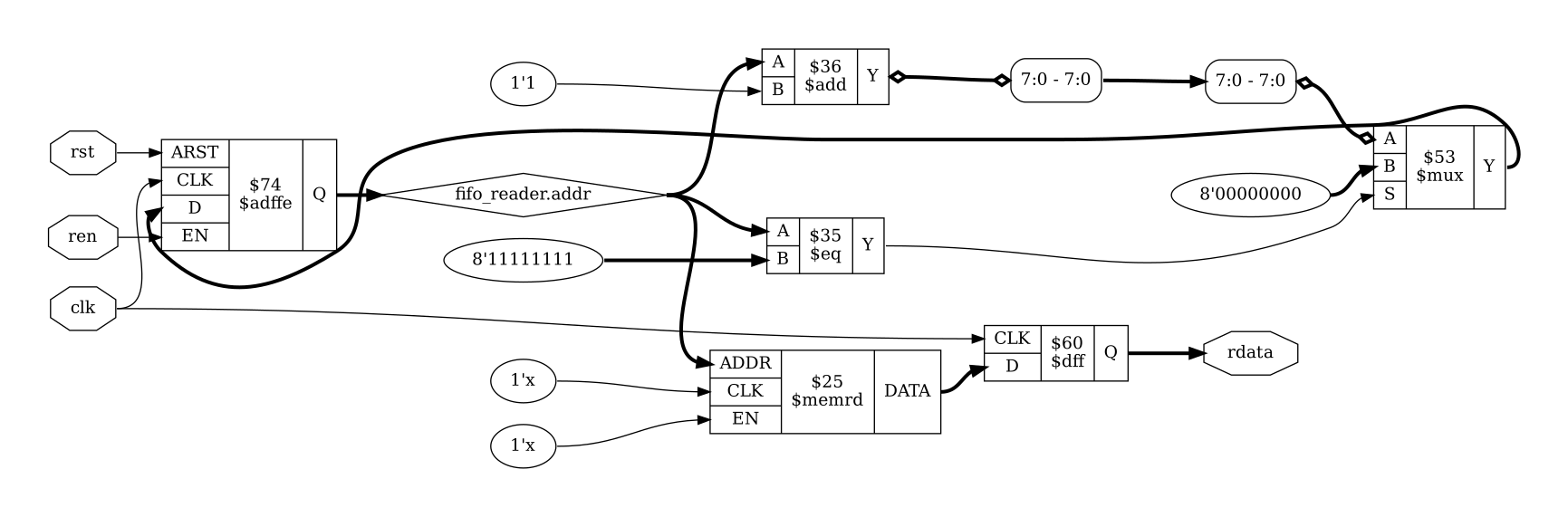
Looking at the data path for rdata, the most relevant of these width
reductions are the ones affecting fifo.$flatten\fifo_reader.$add$fifo.v.
That is the $add cell incrementing the fifo_reader address. We can look at
the schematic and see the output of that cell has now changed.
The next two (new) commands are peepopt - collection of peephole optimizers and share - perform sat-based resource sharing.
Neither of these affect our design, and they’re explored in more detail in
Optimization passes, so let’s skip over them. techmap
-map +/cmp2lut.v -D LUT_WIDTH=4 optimizes certain comparison operators by
converting them to LUTs instead. The usage of techmap is explored more in
Technology mapping.
Our next command to run is memory_dff - merge input/output DFFs into memory read ports.
yosys> memory_dff

22. Executing MEMORY_DFF pass (merging $dff cells to $memrd).
Checking read port `\data'[0] in module `\fifo': merging output FF to cell.
    Write port 0: non-transparent.
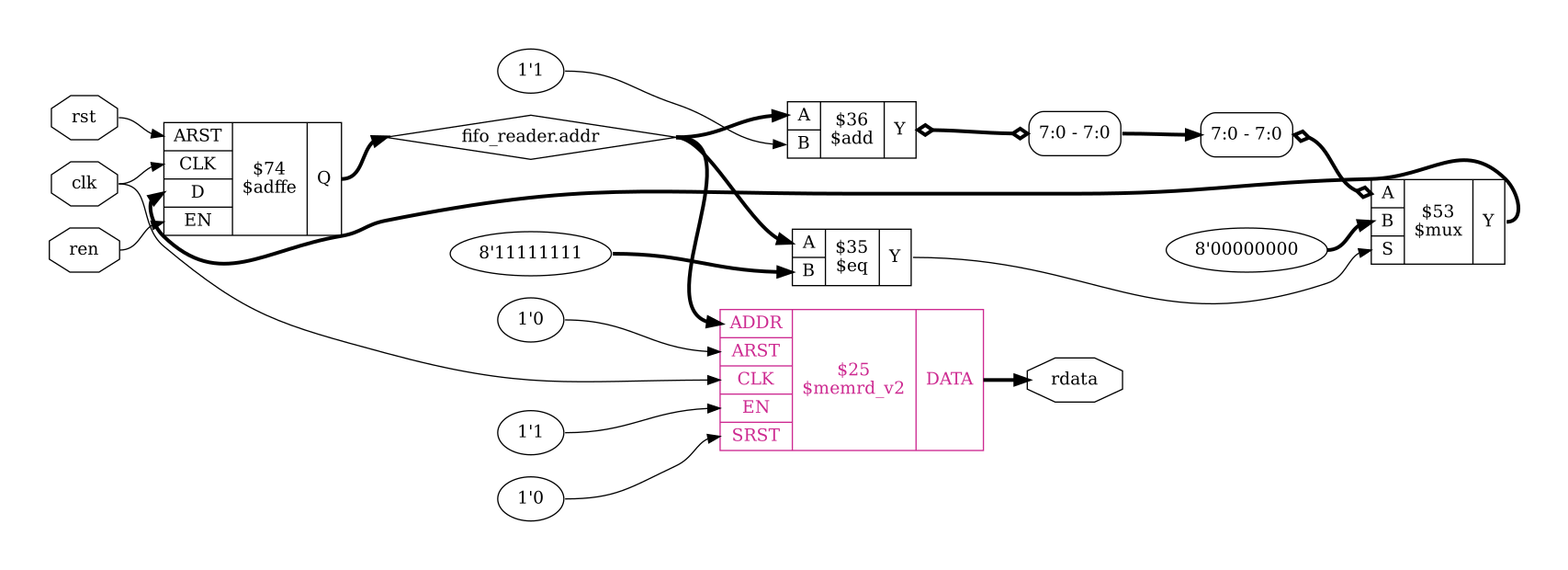
Fig. 9 rdata output after memory_dff
As the title suggests, memory_dff has merged the output $dff into the
$memrd cell and converted it to a $memrd_v2 (highlighted). This has also
connected the CLK port to the clk input as it is now a synchronous
memory read with appropriate enable (EN=1'1) and reset (ARST=1'0 and
SRST=1'0) inputs.
Part 3
The third part of the synth_ice40 flow is a series of commands for mapping to
DSPs. By default, the iCE40 flow will not map to the hardware DSP blocks and
will only be performed if called with the -dsp flag: synth_ice40
-dsp. While our example has nothing that could be mapped to DSPs we can still
take a quick look at the commands here and describe what they do.
wreduce t:$mul
techmap
select a:mul2dsp
setattr -unset mul2dsp
opt_expr -fine
wreduce
select -clear
ice40_dsp
chtype -set $mul t:$__soft_mul
wreduce t:$mul performs width reduction again, this time targetting
only cells of type $mul. techmap -map +/mul2dsp.v -map
+/ice40/dsp_map.v ... -D DSP_NAME=$__MUL16X16 uses techmap to map $mul
cells to $__MUL16X16 which are, in turn, mapped to the iCE40 SB_MAC16.
Any multipliers which aren’t compatible with conversion to $__MUL16X16 are
relabelled to $__soft_mul before chtype changes them back to $mul.
During the mul2dsp conversion, some of the intermediate signals are marked with
the attribute mul2dsp. By calling select a:mul2dsp we restrict
the following commands to only operate on the cells and wires used for these
signals. setattr removes the now unnecessary mul2dsp attribute.
opt_expr we’ve already come across for const folding and simple expression
rewriting, the -fine option just enables more fine-grain optimizations.
Then we perform width reduction a final time and clear the selection.
Finally we have ice40_dsp: similar to the memory_dff command we saw in the
previous section, this merges any surrounding registers into the SB_MAC16
cell. This includes not just the input/output registers, but also pipeline
registers and even a post-adder where applicable: turning a multiply + add into
a single multiply-accumulate.
See also
Advanced usage docs for Technology mapping
Part 4
That brings us to the fourth and final part for the iCE40 synthesis flow:
alumacc
opt
memory -nomap [-no-rw-check]
opt_clean
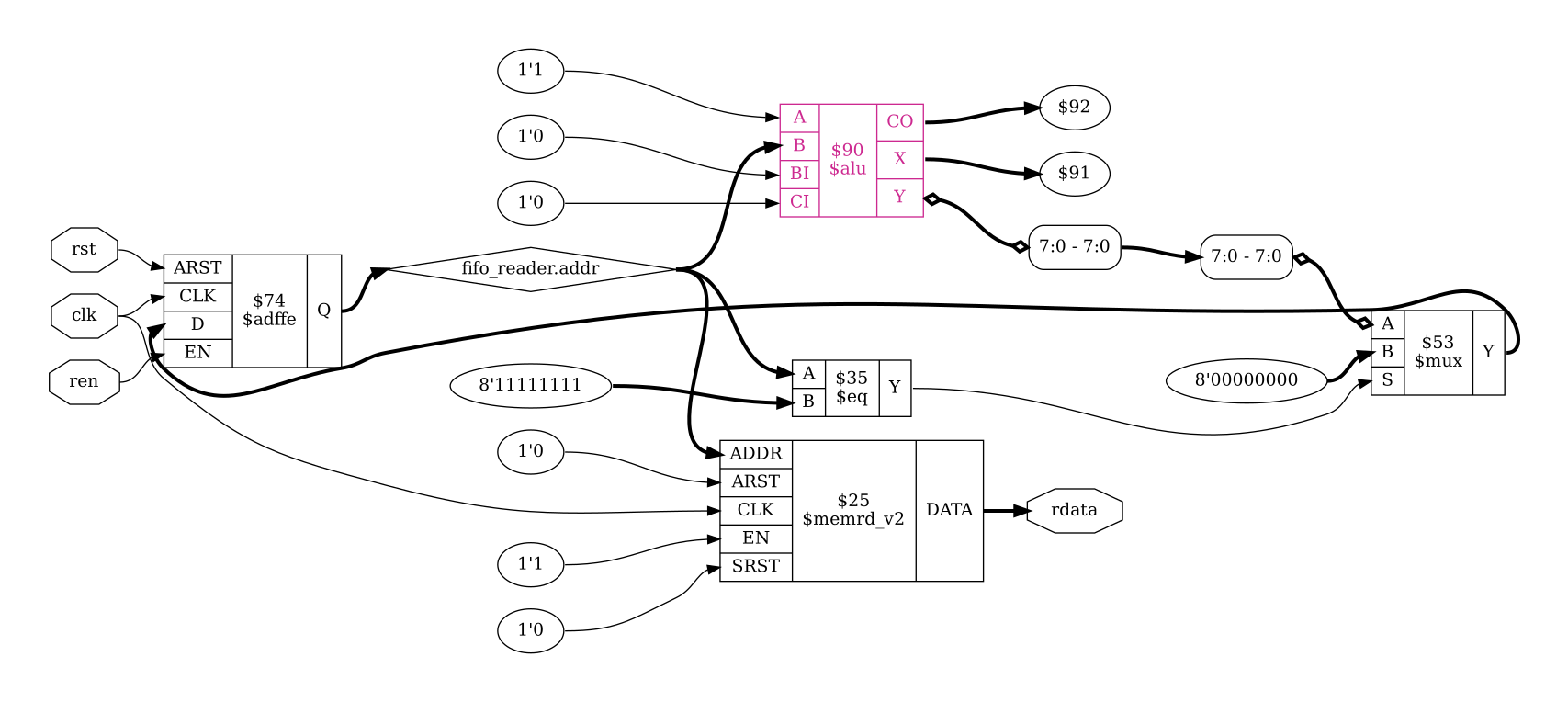
Where before each type of arithmetic operation had its own cell, e.g. $add, we
now want to extract these into $alu and $macc_v2 cells which can help identify
opportunities for reusing logic. We do this by running alumacc, which we can
see produce the following changes in our example design:
yosys> alumacc

24. Executing ALUMACC pass (create $alu and $macc cells).
Extracting $alu and $macc cells in module fifo:
  creating $macc model for $add$fifo.v:66$29 ($add).
  creating $macc model for $flatten\fifo_reader.$add$fifo.v:19$36 ($add).
  creating $macc model for $flatten\fifo_writer.$add$fifo.v:19$36 ($add).
  creating $macc model for $sub$fifo.v:68$32 ($sub).
  creating $alu model for $macc $sub$fifo.v:68$32.
  creating $alu model for $macc $flatten\fifo_writer.$add$fifo.v:19$36.
  creating $alu model for $macc $flatten\fifo_reader.$add$fifo.v:19$36.
  creating $alu model for $macc $add$fifo.v:66$29.
  creating $alu cell for $add$fifo.v:66$29: $auto$alumacc.cc:495:replace_alu$87
  creating $alu cell for $flatten\fifo_reader.$add$fifo.v:19$36: $auto$alumacc.cc:495:replace_alu$90
  creating $alu cell for $flatten\fifo_writer.$add$fifo.v:19$36: $auto$alumacc.cc:495:replace_alu$93
  creating $alu cell for $sub$fifo.v:68$32: $auto$alumacc.cc:495:replace_alu$96
  created 4 $alu and 0 $macc cells.
Once these cells have been inserted, the call to opt can combine cells which
are now identical but may have been missed due to e.g. the difference between
$add and $sub.
The other new command in this part is memory - translate memories to basic cells. memory is another
macro command which we examine in more detail in
Memory handling. For this document, let us focus just on
the step most relevant to our example: memory_collect. Up until this point,
our memory reads and our memory writes have been totally disjoint cells;
operating on the same memory only in the abstract. memory_collect combines all
of the reads and writes for a memory block into a single cell.
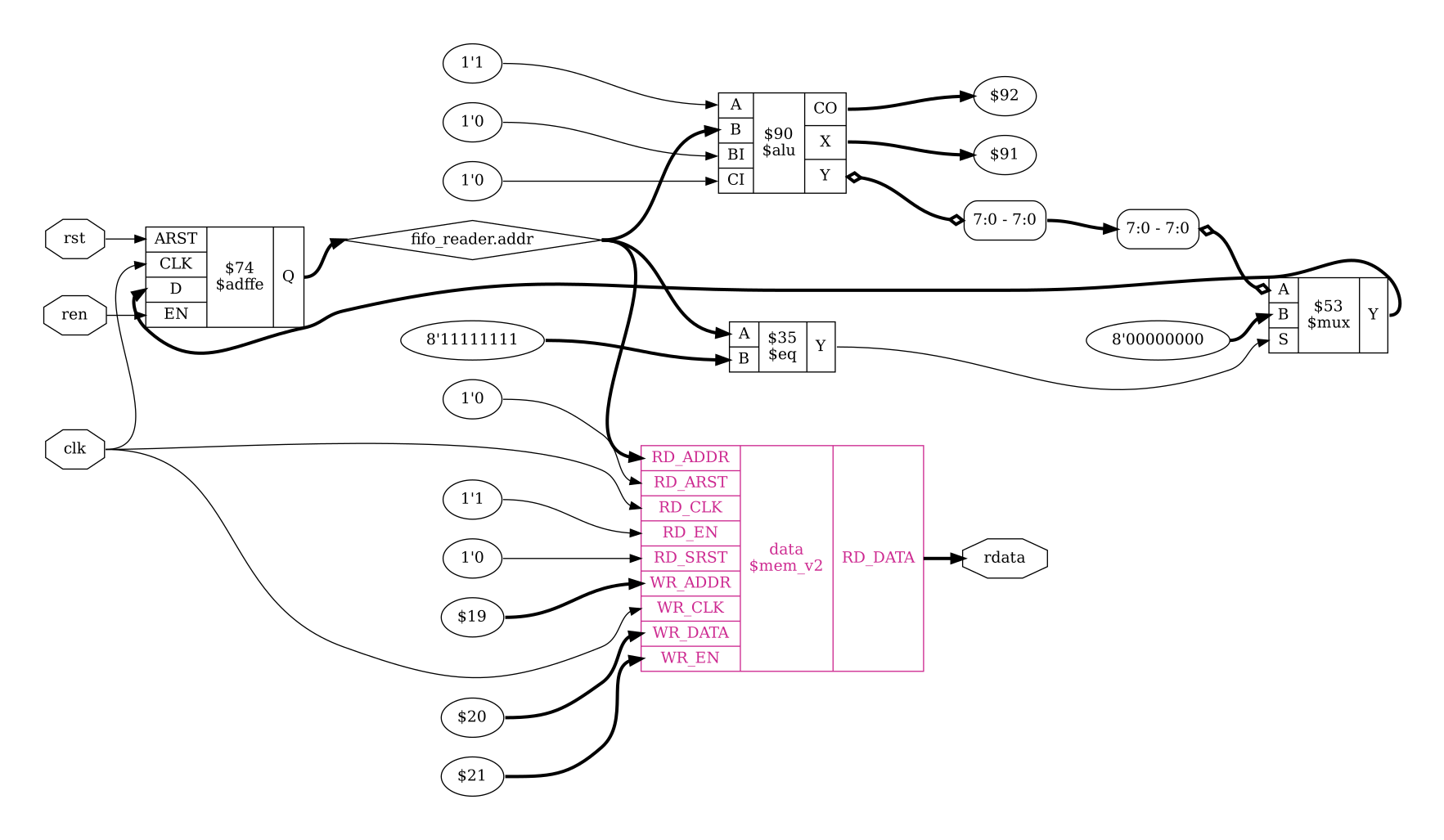
Fig. 11 rdata output after memory_collect
Looking at the schematic after running memory_collect we see that our
$memrd_v2 cell has been replaced with a $mem_v2 cell named data, the
same name that we used in fifo.v. Where before we had a single set of
signals for address and enable, we now have one set for reading (RD_*) and
one for writing (WR_*), as well as both WR_DATA input and RD_DATA
output.
Final note
Having now reached the end of the the coarse-grain representation, we could also
have gotten here by running synth_ice40 -top fifo -run :map_ram
after loading the design. The -run <from_label>:<to_label> option
with an empty <from_label> starts from the begin section, while the
<to_label> runs up to but including the map_ram section.
Hardware mapping
The remaining sections each map a different type of hardware and are much more architecture dependent than the previous sections. As such we will only be looking at each section very briefly.
If you skipped calling read_verilog -D ICE40_HX -lib -specify
+/ice40/cells_sim.v earlier, do it now.
Memory blocks
Mapping to hard memory blocks uses a combination of memory_libmap and
techmap.
memory_libmap
techmap
ice40_braminit
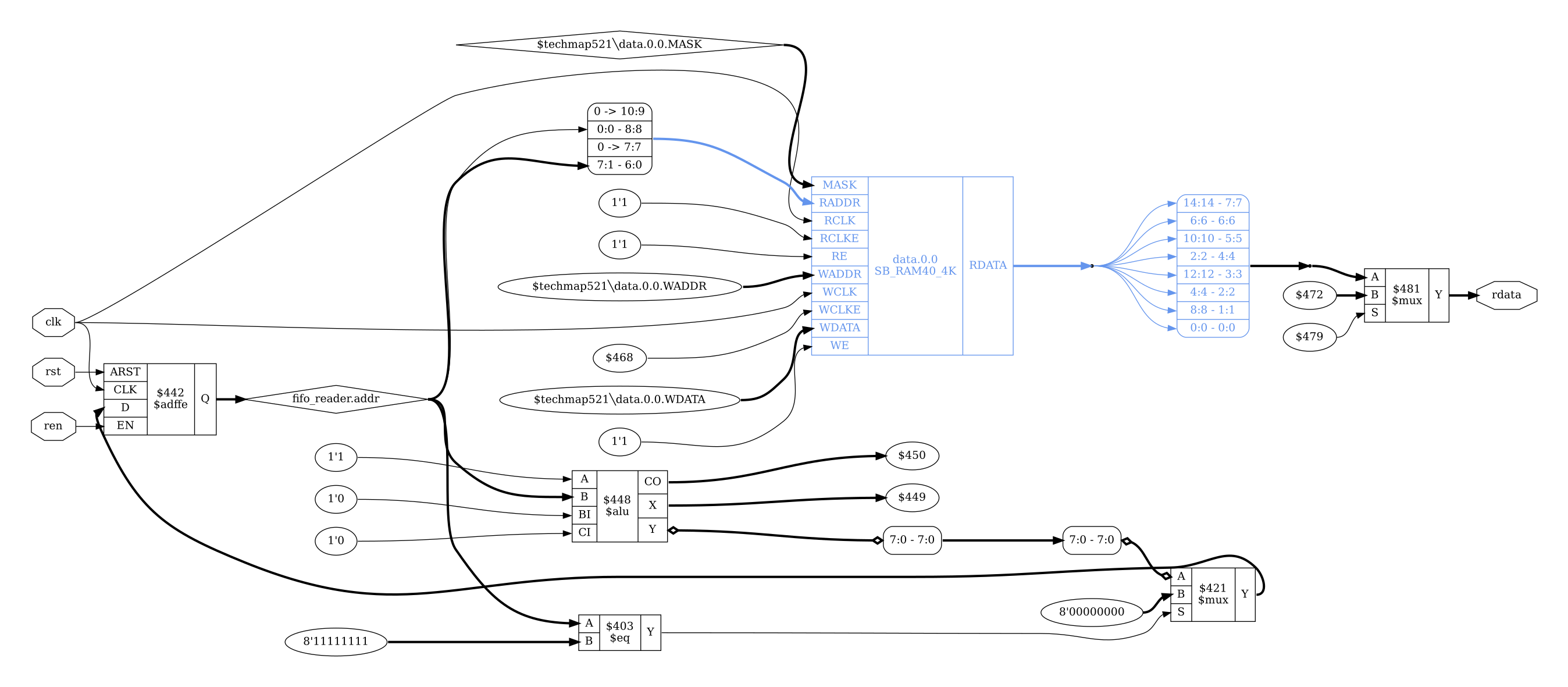
Fig. 12 rdata output after map_ram section
The map_ram section converts the generic $mem_v2 into the iCE40 SB_RAM40_4K
(highlighted). We can also see the memory address has been remapped, and the
data bits have been reordered (or swizzled). There is also now a $mux cell
controlling the value of rdata. In fifo.v we wrote our memory as
read-before-write, however the SB_RAM40_4K has undefined behaviour when
reading from and writing to the same address in the same cycle. As a result,
extra logic is added so that the generated circuit matches the behaviour of the
verilog. Synchronous SDP with undefined collision behavior describes how we could change our verilog to match
our hardware instead.
If we run memory_libmap under the debug command we can see candidates which
were identified for mapping, along with the costs of each and what logic
requires emulation.
yosys> debug memory_libmap -lib +/ice40/brams.txt -lib +/ice40/spram.txt -no-auto-huge
4. Executing MEMORY_LIBMAP pass (mapping memories to cells).
Memory fifo.data mapping candidates (post-geometry):
- logic fallback
  - cost: 2048.000000
- $__ICE40_RAM4K_:
  - option HAS_BE 0
  - emulation score: 7
  - replicates (for ports): 1
  - replicates (for data): 1
  - mux score: 0
  - demux score: 0
  - cost: 78.000000
  - abits 11 dbits 2 4 8 16
  - chosen base width 8
  - swizzle 0 1 2 3 4 5 6 7
  - emulate read-first behavior
  - write port 0: port group W
    - widths 2 4 8
  - read port 0: port group R
    - widths 2 4 8 16
    - emulate transparency with write port 0
- $__ICE40_RAM4K_:
  - option HAS_BE 1
  - emulation score: 7
  - replicates (for ports): 1
  - replicates (for data): 1
  - mux score: 0
  - demux score: 0
  - cost: 78.000000
  - abits 11 dbits 2 4 8 16
  - byte width 1
  - chosen base width 8
  - swizzle 0 1 2 3 4 5 6 7
  - emulate read-first behavior
  - write port 0: port group W
    - widths 16
  - read port 0: port group R
    - widths 2 4 8 16
    - emulate transparency with write port 0
Memory fifo.data mapping candidates (after post-geometry prune):
- logic fallback
  - cost: 2048.000000
- $__ICE40_RAM4K_:
  - option HAS_BE 0
  - emulation score: 7
  - replicates (for ports): 1
  - replicates (for data): 1
  - mux score: 0
  - demux score: 0
  - cost: 78.000000
  - abits 11 dbits 2 4 8 16
  - chosen base width 8
  - swizzle 0 1 2 3 4 5 6 7
  - emulate read-first behavior
  - write port 0: port group W
    - widths 2 4 8
  - read port 0: port group R
    - widths 2 4 8 16
    - emulate transparency with write port 0
mapping memory fifo.data via $__ICE40_RAM4K_
The $__ICE40_RAM4K_ cell is defined in the file techlibs/ice40/brams.txt,
with the mapping to SB_RAM40_4K done by techmap using
techlibs/ice40/brams_map.v. Any leftover memory cells are then converted
into flip flops (the logic fallback) with memory_map.
opt -fast -mux_undef -undriven -fine
memory_map
opt -undriven -fine
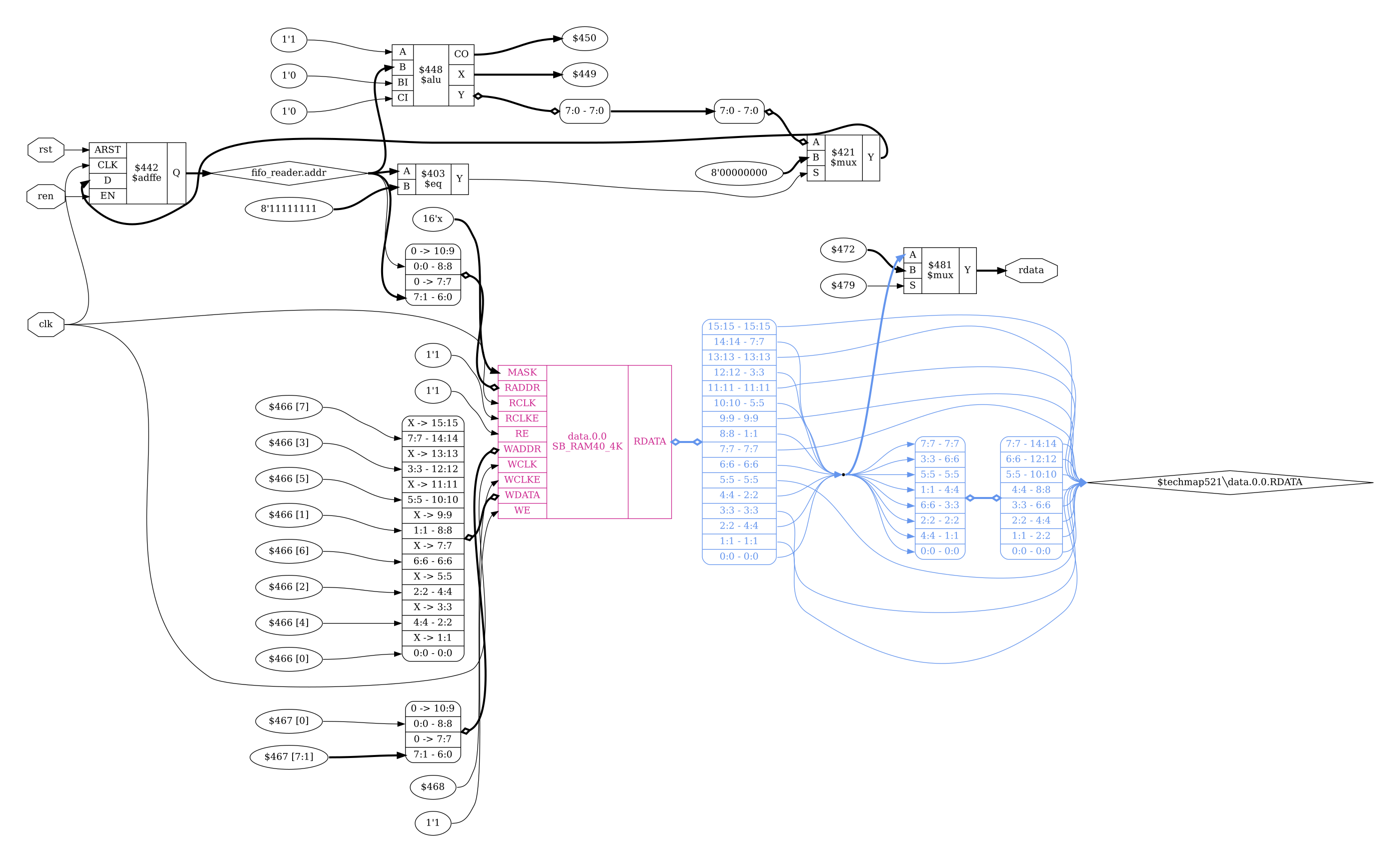
Fig. 13 rdata output after map_ffram section
Arithmetic
Uses techmap to map basic arithmetic logic to hardware. This sees somewhat of
an explosion in cells as multi-bit $mux and $adffe are replaced with
single-bit $_MUX_ and $_DFFE_PP0P_ cells, while the $alu is replaced with
primitive $_OR_ and $_NOT_ gates and a $lut cell.
ice40_wrapcarry
techmap
opt -fast
abc -dff -D 1
ice40_opt
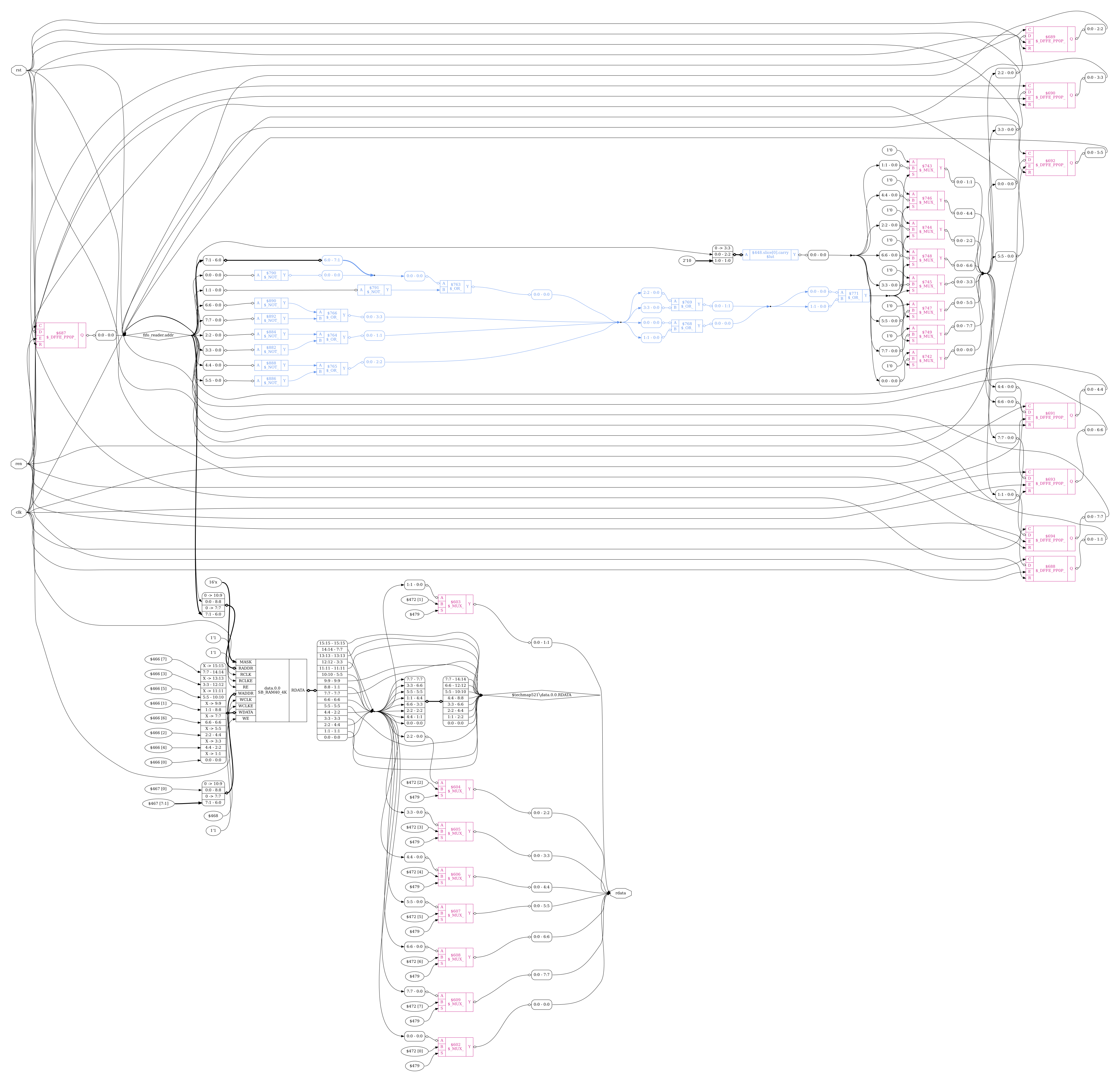
Fig. 14 rdata output after map_gates section
See also
Advanced usage docs for Technology mapping
Flip-flops
Convert FFs to the types supported in hardware with dfflegalize, and then use
techmap to map them. In our example, this converts the $_DFFE_PP0P_ cells
to SB_DFFER.
We also run simplemap here to convert any remaining cells which could not be
mapped to hardware into gate-level primitives. This includes optimizing
$_MUX_ cells where one of the inputs is a constant 1'0, replacing it
instead with an $_AND_ cell.
dfflegalize
techmap
opt_expr -mux_undef
simplemap
ice40_opt -full
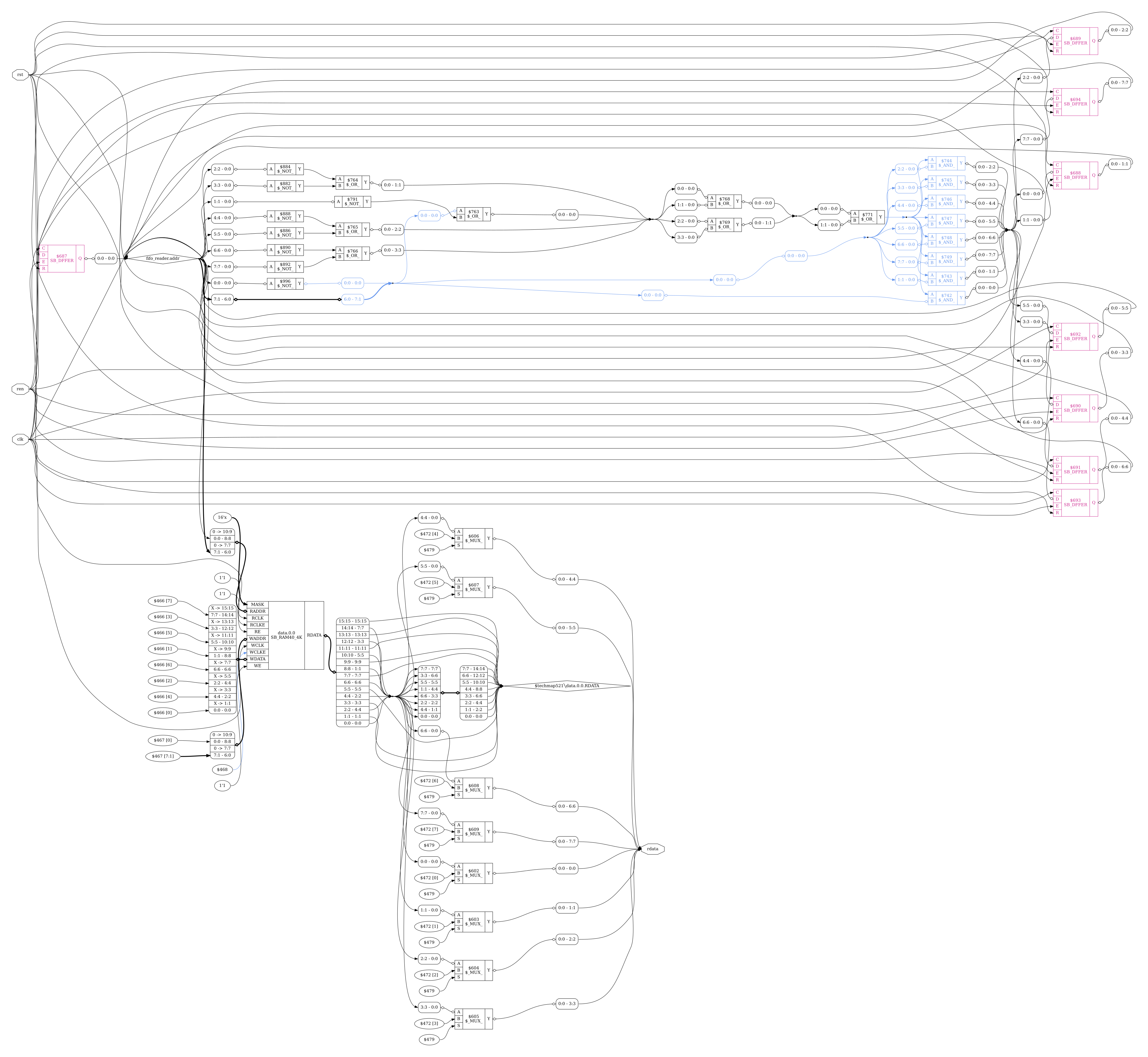
Fig. 15 rdata output after map_ffs section
See also
Advanced usage docs for Technology mapping
LUTs
abc and techmap are used to map LUTs; converting primitive cell types to use
$lut and SB_CARRY cells. Note that the iCE40 flow uses abc9 rather than
abc. For more on what these do, and what the difference between these two
commands are, refer to The ABC toolbox.
abc
ice40_opt
techmap
simplemap
techmap
flowmap
read_verilog
abc9
ice40_wrapcarry -unwrap
techmap
clean
opt_lut -tech ice40
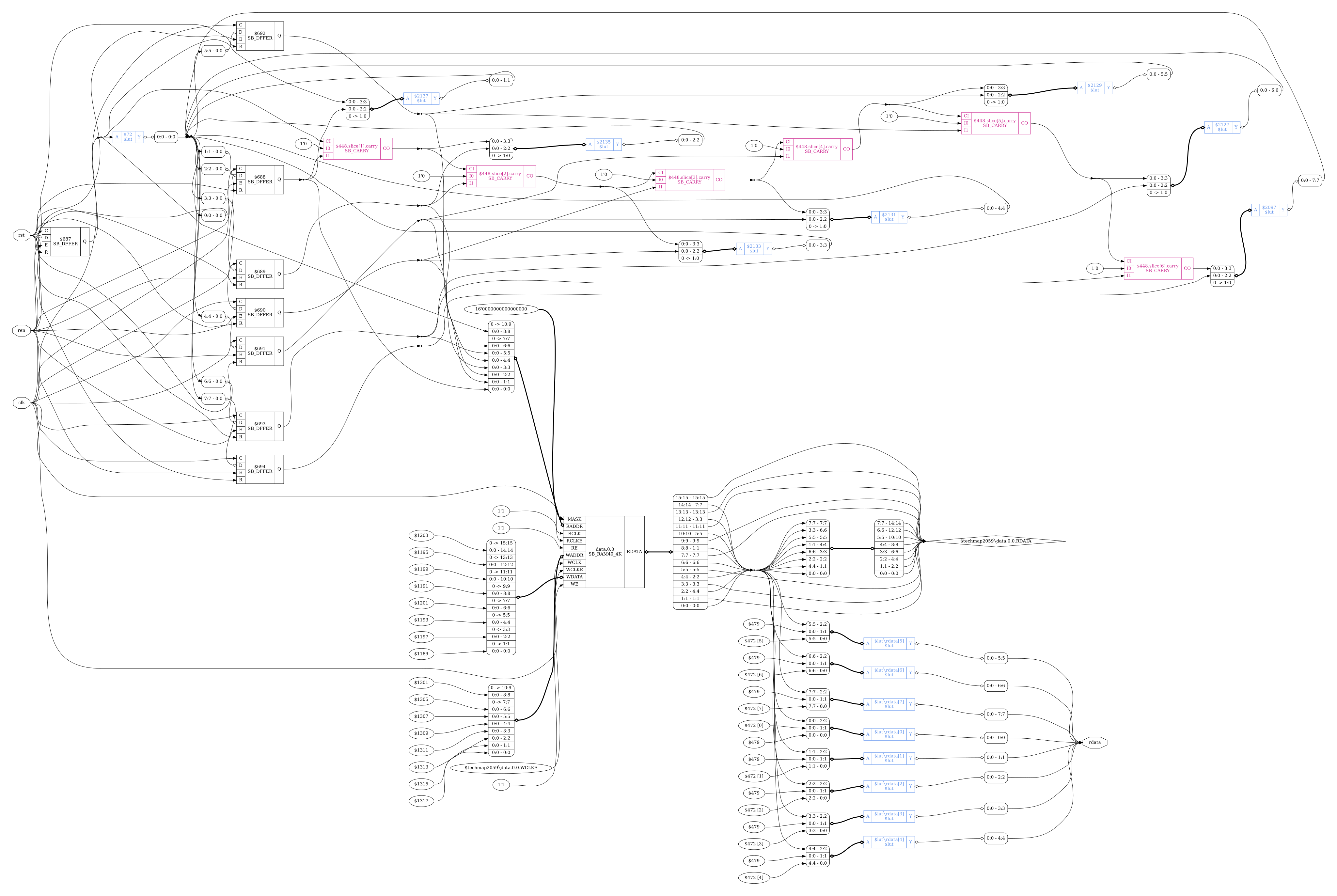
Fig. 16 rdata output after map_luts section
Finally we use techmap to map the generic $lut cells to iCE40 SB_LUT4
cells.
techmap
clean
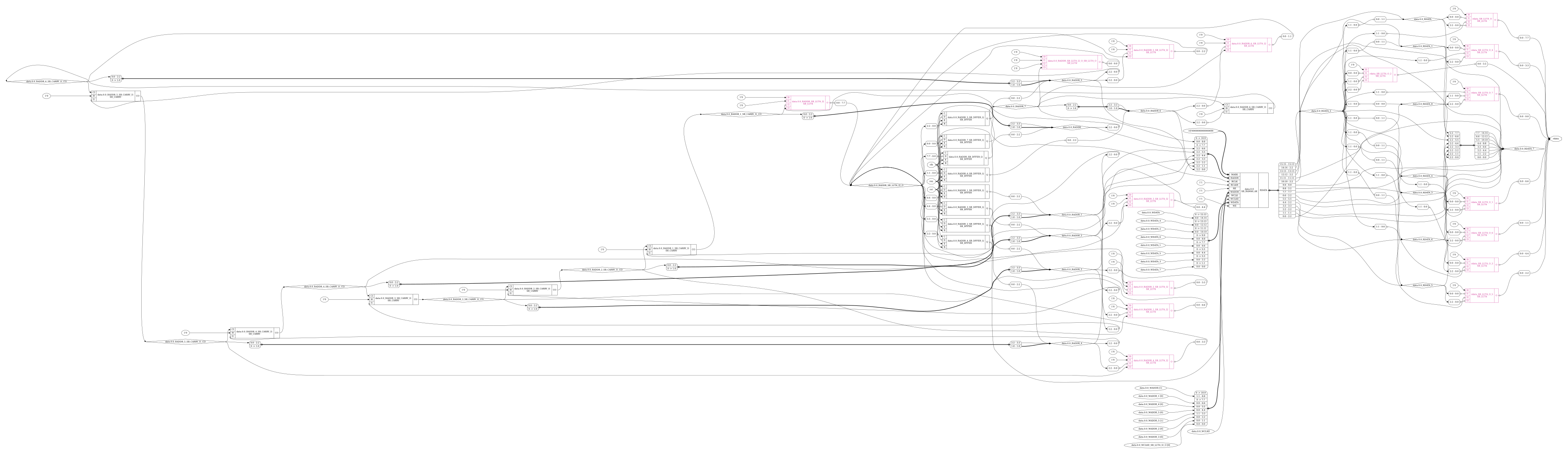
Fig. 17 rdata output after map_cells section
Other cells
The following commands may also be used for mapping other cells:
hilomapSome architectures require special driver cells for driving a constant hi or lo value. This command replaces simple constants with instances of such driver cells.
iopadmapTop-level input/outputs must usually be implemented using special I/O-pad cells. This command inserts such cells to the design.
These commands tend to either be in the map_cells section or after the check section depending on the flow.
Final steps
The next section of the iCE40 synth flow performs some sanity checking and final tidy up:
autoname
hierarchy -check
stat
check -noinit
blackbox =A:whitebox
The new commands here are:
The output from stat is useful for checking resource utilization; providing a
list of cells used in the design and the number of each, as well as the number
of other resources used such as wires and processes. For this design, the final
call to stat should look something like the following:
yosys> stat -top fifo

17. Printing statistics.

=== fifo ===

        +----------Local Count, excluding submodules.
        |
       96 wires
      264 wire bits
       96 public wires
      264 public wire bits
        7 ports
       29 port bits
      140 cells
        2   $scopeinfo
       26   SB_CARRY
       26   SB_DFF
       25   SB_DFFER
       60   SB_LUT4
        1   SB_RAM40_4K
Note that the -top fifo here is optional. stat will automatically
use the module with the top attribute set, which fifo was when we called
hierarchy. If no module is marked top, then stats will be shown for each
module selected.
The stat output is also useful as a kind of sanity-check: Since we have
already run proc, we wouldn’t expect there to be any processes. We also expect
data to use hard memory; if instead of an SB_RAM40_4K saw a high number
of flip-flops being used we might suspect something was wrong.
If we instead called stat immediately after read_verilog fifo.v we
would see something very different:
yosys> stat

2. Printing statistics.

=== fifo ===

        +----------Local Count, excluding submodules.
        |
       28 wires
      219 wire bits
        9 public wires
       45 public wire bits
        7 ports
       29 port bits
        1 memories
     2048 memory bits
        3 processes
        7 cells
        1   $add
        2   $logic_and
        2   $logic_not
        1   $memrd
        1   $sub
        2 submodules
        2   addr_gen

=== addr_gen ===

        +----------Local Count, excluding submodules.
        |
        8 wires
       60 wire bits
        4 public wires
       11 public wire bits
        4 ports
       11 port bits
        2 processes
        2 cells
        1   $add
        1   $eq
Notice how fifo and addr_gen are listed separately, and the statistics
for fifo show 2 addr_gen modules. Because this is before the memory has
been mapped, we also see that there is 1 memory with 2048 memory bits; matching
our 8-bit wide data memory with 256 values (\(8*256=2048\)).
Synthesis output
The iCE40 synthesis flow has the following output modes available:
write_edif, and
As an example, if we called synth_ice40 -top fifo -json fifo.json,
our synthesized fifo design will be output as fifo.json. We can
then read the design back into Yosys with read_json, but make sure you use
design -reset or open a new interactive terminal first. The JSON
output we get can also be loaded into nextpnr to do place and route; but that
is beyond the scope of this documentation.